I have understood that not many know about the reporting capabilities of Tracktimer, even with the basic version you can get a good overview of your sessions.
(Note that these are in Swedish)
A list of my sessions this year sorted on date and grouped by arrangement looks like this.
A more compact view is the statistics view this time without lap times, it looks like this.
My track database is here.
The tires on the 125 seems to last forever, and I mean forever!!! (this requires the Pro version)
Friday, June 01, 2007


Sunday, May 13, 2007
Ciao!
At last the next release is out, version 3.0.0.60!
This time Tracktimer comes in two new languages: Italian and Spanish! The demo version has also been slightly changed so you can save lap times for one driver and the session notes and track data. New algorithms for RAD and AD calculations have been implemented with courtesy if Mr Richard Shelquist, Shelquist Engineering.
Here is a list of all changes from the last public version 3.0.0.58:
Version 3.0.0.60
2007-05-13
Version 3.0.0.59
2007-03-27
Have fun! :)
/Torkel
This time Tracktimer comes in two new languages: Italian and Spanish! The demo version has also been slightly changed so you can save lap times for one driver and the session notes and track data. New algorithms for RAD and AD calculations have been implemented with courtesy if Mr Richard Shelquist, Shelquist Engineering.
Here is a list of all changes from the last public version 3.0.0.58:
Version 3.0.0.60
2007-05-13
- Wider jetting columns for less than 3 cylinders, fixed annoying narrow column with one cylinder
- Fixed bug that made stock groups sometimes loos their stock property during update from session
- Lap counter reset when reseting session
- Only sorts maintenance log if date has been changed after edit of a row
- Handles empty string for number of split times/lap
- Shows a warning dialog if the supplier for an order status item doesn't exist in the list of suppliers when trying to edit it
- Clears order grid before entering data into it in purchase order dialog
Version 3.0.0.59
2007-03-27
- Added a button to associate a session with an onboard video recording
- Demo version can now save session notes and track data
- Datalogging button available for Basic versions too
- Remembers directory for datalogging and onboard video import
- Removed Open button from Datalogging dialog
- Shows RAD or AD in list of completed sessions
- Added links to order pages at share-it
- Added warning dialogs for areas that the current version doesn't support
- Removed way to show how basic mode looks like
- Added possibility to choose between AD or RAD
- Jetting Guru now handles 20 rows and can calculate jetting based on Rotax formula too
- New algorithms for RAD/AD calculations from Richard Shelquist, Shelquist Engineering, Longmont, Colorado, USA
- Shows correct decimals for speeds in Gearing page
- Added way to calculate remaining volume of fuel based on weight of tank (or vehicle)
- Add possibility to sort part status export on Storage
- Added second sort order for part status export
- Shows all parts that are in the Pro versions for both Basic and Demo versions with warning dialogs that these sections cannot be saved (only shown once per session)
- Formats mileages for tire exports correctly
- Indicates sort direction and order in the header columns
- Ctrl-click sets third sort column in grids
- Changed from Barometric pressure to Actual pressure
- Changed Humidity to Rel. Humidity
- Can import lap times from Bullet DVR logger
- Added Spanish translation thanks to Cesar A. Guerrero Morente
- Added Italian translation thanks to Fuser Francesco
- Possible to delete more than one tire at the same time from the tire database
- Deletes tire history correctly
- No error message if a supplier is added and there is no sort column chosen
- Remembers window state between program starts
Have fun! :)
/Torkel
Monday, April 02, 2007
Order received!
Sorry for being a bit late with this post, I've had the parts lying around for about two weeks now but tonight is "blogging time" so I will update Tracktimers order status right now!
First I went through the package and noted that the rotor puller was missing. It should be sent when it was available (fact is that I have already gotten it).
Anyway, I select all order items except the rotor puller...
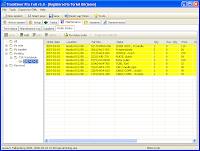
And then I click on Edit to change all the selected parts...
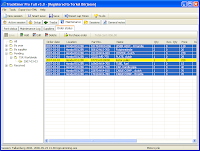
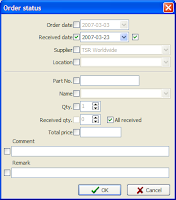
I mark the date the parts were received and then I check the "All received" check box...
Then I select to add the new parts to my stock group and a list of the parts that will be updated is shown...
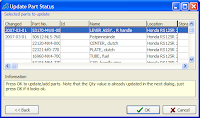
If any of the parts doesn't exist Tracktimer adds it like a normal addition of a part, if the part entry exists it gets updated with a new qty.
Then I can choose to also update the maintenance log for this vehicle, so I chose the Honda RS125R group...
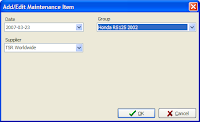
Now the only order item that remains is the missing rotor puller...
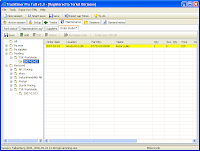
Here are the parts that were added to the maintenance log...
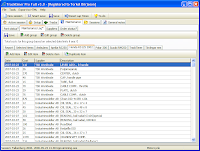
And here we can see that the brake handle now has a quantity that is equal to the required quantity.
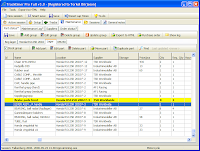
Done! Now all these parts are in the part status system and are ready to be moved into an active part status group where they will collect hours and mileages. As I move one part and the actual quantity is less than the required quantity I can easily create a new purchase order that I can send to my supplier.
First I went through the package and noted that the rotor puller was missing. It should be sent when it was available (fact is that I have already gotten it).
Anyway, I select all order items except the rotor puller...

And then I click on Edit to change all the selected parts...

I mark the date the parts were received and then I check the "All received" check box...

Then I select to add the new parts to my stock group and a list of the parts that will be updated is shown...

If any of the parts doesn't exist Tracktimer adds it like a normal addition of a part, if the part entry exists it gets updated with a new qty.
Then I can choose to also update the maintenance log for this vehicle, so I chose the Honda RS125R group...

Now the only order item that remains is the missing rotor puller...

Here are the parts that were added to the maintenance log...

And here we can see that the brake handle now has a quantity that is equal to the required quantity.

Done! Now all these parts are in the part status system and are ready to be moved into an active part status group where they will collect hours and mileages. As I move one part and the actual quantity is less than the required quantity I can easily create a new purchase order that I can send to my supplier.
Saturday, March 03, 2007
Initialization rites
For my new bike that is! I got some spare parts with the bike but since I hadn't entered them into Tracktimer I had no clue exactly what I got.
So I brought my laptop to the garage and started to go through box after box. I noted all the article numbers as I added them to my Stock group. I named their location as "Honda RS125R 2002 X-nn" where X-nn stands for the section in the manual where this part is defined. For example the main jets are found on page E-10 so their location is "Honda RS125R 2002 E-10".
I created another stock group for used parts and entered those too in the same fashion but also entered mileage data for those that had that information. (one piston...:()
This is how my stock group looks now (I changed to the English version for these screen shots, normally I run the the Swedish version so the groups and some parts are named in Swedish).

I ordered some parts today from TSRWorldWide and wanted to get those into Tracktimers order system.
I first added my two new suppliers Industrimodeller and TSRWorldWide into my list of suppliers.
I had entered some of those parts into my stock with a qty of zero but there were new parts that I hadn't entered (like the inner clutch basket i broke today...) I first made an automatic purchase order and then added the other parts to that list together with supplier. When this process was completed they were found in the Order status.
Then I did the same thing for other parts I ordered from Industrimodeller about a month ago. Now the order date is todays date by default, to change it to 12th of February I selected all order items from the supplier Industrimodeller and changed the order date.
My order status page for these parts now looks like this.

Normally I do it the other way around, that is I let Tracktimer tell me what I need to order but these parts were ordered before I had entered anything into Tracktimer.
When I get the parts I will update the order status and Tracktimer will automatically enter them into my stock group so next time I can use the automatic purchase order fully.
Now I just have to wait for the parts and then I can start to replace the crankshaft on my engine that I removed from the frame this morning. To be continued!
The tiny RS125R engine

So I brought my laptop to the garage and started to go through box after box. I noted all the article numbers as I added them to my Stock group. I named their location as "Honda RS125R 2002 X-nn" where X-nn stands for the section in the manual where this part is defined. For example the main jets are found on page E-10 so their location is "Honda RS125R 2002 E-10".
I created another stock group for used parts and entered those too in the same fashion but also entered mileage data for those that had that information. (one piston...:()
This is how my stock group looks now (I changed to the English version for these screen shots, normally I run the the Swedish version so the groups and some parts are named in Swedish).

I ordered some parts today from TSRWorldWide and wanted to get those into Tracktimers order system.
I first added my two new suppliers Industrimodeller and TSRWorldWide into my list of suppliers.
I had entered some of those parts into my stock with a qty of zero but there were new parts that I hadn't entered (like the inner clutch basket i broke today...) I first made an automatic purchase order and then added the other parts to that list together with supplier. When this process was completed they were found in the Order status.
Then I did the same thing for other parts I ordered from Industrimodeller about a month ago. Now the order date is todays date by default, to change it to 12th of February I selected all order items from the supplier Industrimodeller and changed the order date.
My order status page for these parts now looks like this.

Normally I do it the other way around, that is I let Tracktimer tell me what I need to order but these parts were ordered before I had entered anything into Tracktimer.
When I get the parts I will update the order status and Tracktimer will automatically enter them into my stock group so next time I can use the automatic purchase order fully.
Now I just have to wait for the parts and then I can start to replace the crankshaft on my engine that I removed from the frame this morning. To be continued!
The tiny RS125R engine

Tuesday, February 06, 2007
New tutorial
After a quick look through my existing flash tutorials I felt that I needed to do a tutorial that gives a little more overview of the program instead of focusing on smaller functions. I deliberately omitted to enter any data in the fields to make it as minimalistic as possible. Have a look here.
I recommend opening that link in a new tab or window.
I recommend opening that link in a new tab or window.
Friday, January 19, 2007

Friday, December 15, 2006
Merry Christmas!
 I have a special gift this time, all the basic versions are now available for just 10 euros (+ VAT if applicable)!
I do this because I would like to see a really large user community which will help to market (marketing is HARD!) Tracktimer and hopefully a few of you will upgrade to the Pro version. I also do it because I am getting into the comfy Christmas mood with lots of "ho ho" and Swedish Christmas food! :)
We'll see what happens, I still think the basic versions are the most "bang for the buck" for anyones racing!
Happy racing
/Torkel
Thursday, December 07, 2006
Version Francaise
Hello!

Time for a new release of Tracktimer, this time the main feature is that it has been translated to French thanks to Willy Nsiala!
I am also grateful to George Vukmanovich who has given me lots of good feedback, more improvements to come.
There are also numerous other small changes and improvements since 3.0.0.55:


Version 3.0.0.58
2006-11-14
- Better handling of old versions when reading orderstatus
- New look for track export
- Possible to delete source row when moving a part between two stock groups
- Inspection report sorts on Location by default
- Order status edit: Only writes received order date if the checkbox has been set
- Order status edit: Enables the received date checkbox if several parts have the same received date
- Order status edit: Fixed bug so that the remark edit control is enabled correctly
Version 3.0.0.57
2006-10-25
- Enhanced purchase order export with page breaks, remark column, new column ordering, possible to hide price and shows phone number
- Fixed display error for shaft drive
- Correct update of track details when selecting a new track in New session dialog
- Possible to upscale track maps to a fit a certain size when exporting tracks
- Added import from 2D Datarecording data files
- Parts are identified by location too as well as name and partno
- Replaced fuel consumption number Litre/100*km with Km/litre
- Update to Part Status dialog only shows if recieved qty > 0 when editing order items
- Speeds for each gear and rpm are included in html export
- Field Location is shown for all part status groups and also possible to sort by when making automatic purchase o rder
- Fixed strange error message when trying to edit empty lap time grid
- Added French translation
Version 3.0.0.56
2006-10-08
- Faster edit of parts, no more unnecessary sorting
- Shows speeds and rpm in html export
- One more decimal for speeds and ratios
- Fixed final gearing visibility problem
- Location field always visible
- Possible to sort part status reports on Location
Registered users should get an automatic update if Tracktimer is started on a computer connected to Internet, if not contact me and I will help you to upgrade.

Personally I have invested in a new bike for 2007, I will try to fit my 194 cm on a Honda RS125R racer! It will be very interesting and I will have full use of Tracktimer with this bike, it's a bit more sensitive than my former bike, the Aprilia RS250.

I also visited Valencia for the MotoGP finals where I met engineers from Team Toth Aprilia and Jeremy Burgess himself. Unfortunately the Burgess meeting was a short one on Sunday morning so I didn't have a chance to show him anything but he got a demo CD and we'll see what happens.


And by the way, the mysterious visitor I wrote about in the previous post has presented himself, it was Andy who used www.tracktimer.com as home page! A very good idea by the way! :D


Saturday, August 26, 2006
Frustration
I have now been waiting for my main computer to get back from service for 5 weeks! A combination of vacation and bad communication from their side and me thinking that I would get it back any day made me decide not to bother to set up the Tracktimer build environment on my laptop. But in retrospective I should have done that a long time ago because I still haven't received the computer!
Anyway, I just wanted to let you all know that I'm alive despite no updates and will soon be kicking again (or something!)! According to the service guys the last part needed will arrive on Monday so it's close now! :)
Another thing I wonder is who the guy from the Sheffield area is that has been visiting my site about 5 times EVERY day for the last two months? *scratches my head*
Anyway, you're welcome and if you have any questions about Tracktimer just let me know!
Anyway, I just wanted to let you all know that I'm alive despite no updates and will soon be kicking again (or something!)! According to the service guys the last part needed will arrive on Monday so it's close now! :)
Another thing I wonder is who the guy from the Sheffield area is that has been visiting my site about 5 times EVERY day for the last two months? *scratches my head*
Anyway, you're welcome and if you have any questions about Tracktimer just let me know!
Thursday, May 25, 2006
Race this weekend
On my home track too! This will be fun, it also looks as if it will rain on the race day... Historically I have proven to be quite good in rain so this time anything other than podium is a big disappointment! That goes for the dry race as well.
Tracktimer development has been slow the last weeks, I am discussing a quite big redesign of the sidecar part since modern sidecars are more like cars but with three wheels instead.
I had a phone call yesterday with a friend in advertising (who also races bikes) about what you as a racer will gain by using Tracktimer, just saying that it's good isn't enough to make people buy it (but it is, good I mean!)
Still, the most important benefit of using Tracktimer is that you force yourself to think and analyze your racing and get this feeling of being on top of all the small details.
A quick update about the race:
I qualified at 7th place with lap times about 2 seconds slower than I normally run. A combination of a lot of headwind on the straight and an engine that doesn't perform very well is the reason for this. Come raceday and I felt feverish, my forehead was dripping with sweat after the warmup, this didn't feel good. Anyway I did a good start (again!) and was fifth into the first curve, then on the long straight I could not follow the other bikes and after six laps the engine made a noise that sounded very expensive so I had to stop, at that moment I held 7th place. I haven't looked at the engine yet so it could be anything from broken gearbox to a broken exhaust valve.
So two races so far and two DNF's, at last me and Rossi have something in common! :)
Tracktimer development has been slow the last weeks, I am discussing a quite big redesign of the sidecar part since modern sidecars are more like cars but with three wheels instead.
I had a phone call yesterday with a friend in advertising (who also races bikes) about what you as a racer will gain by using Tracktimer, just saying that it's good isn't enough to make people buy it (but it is, good I mean!)
You will force yourself to make notes after each session. This means that you will learn more from each session both about yourself and the vehicle you are using. By using the Maintenance functionality you will service your vehicle when it is needed to, not too often and not too seldom. This gives you an edge in knowing that the parts that you are using probably won't break in the middle of a race. This makes you confident and you can concentrate on going fast! You will very easily be able to look up data from older sessions if you have internet connection, just export all sessions and upload to a web server (if you have an ISP you always get 10-20 MB of storage for a personal home page, check it!). This is invaluable if you are working with suspension engineers, engine builders and such. They can read all data from your tests and also see all the settings used. Not to mention extremely interested sponsors that want to know everything about the last race. The first setup you enter into Tracktimer should be as complete as possible. Later setups should be based on the setup you used before which means that you will always have the complete setup available, not just the changes between two sessions. So if the bike/car/kart is completely disassembled you can put it back to the same settings as you had before.
Still, the most important benefit of using Tracktimer is that you force yourself to think and analyze your racing and get this feeling of being on top of all the small details.
A quick update about the race:
I qualified at 7th place with lap times about 2 seconds slower than I normally run. A combination of a lot of headwind on the straight and an engine that doesn't perform very well is the reason for this. Come raceday and I felt feverish, my forehead was dripping with sweat after the warmup, this didn't feel good. Anyway I did a good start (again!) and was fifth into the first curve, then on the long straight I could not follow the other bikes and after six laps the engine made a noise that sounded very expensive so I had to stop, at that moment I held 7th place. I haven't looked at the engine yet so it could be anything from broken gearbox to a broken exhaust valve.
So two races so far and two DNF's, at last me and Rossi have something in common! :)
Subscribe to:
Posts (Atom)